AWS IAM Identity Center Sign-In Failure Caused by an MTU Black Hole
When the AWS access portal loads but authentication hangs indefinitely, the fault may lie below the application layer. How a 1478-byte path MTU and dropped ICMP messages created a silent TLS handshake black hole.
Environment: Fedora Linux · Wi-Fi (802.11) + AWS VPN Client · AWS IAM Identity Center
Four days after resolving an IAM Identity Center sign-in failure caused by host clock skew, authentication broke again with an almost indistinguishable symptom: the AWS access portal loaded in the browser, but submitting credentials hung indefinitely before failing with a generic error asking to contact an administrator.
The fact that the initial portal page loaded was the most deceptive aspect of the failure. Because the browser rendered the login interface, the natural assumption was that network connectivity was completely healthy and that AWS account configuration or federated identity permissions were broken.
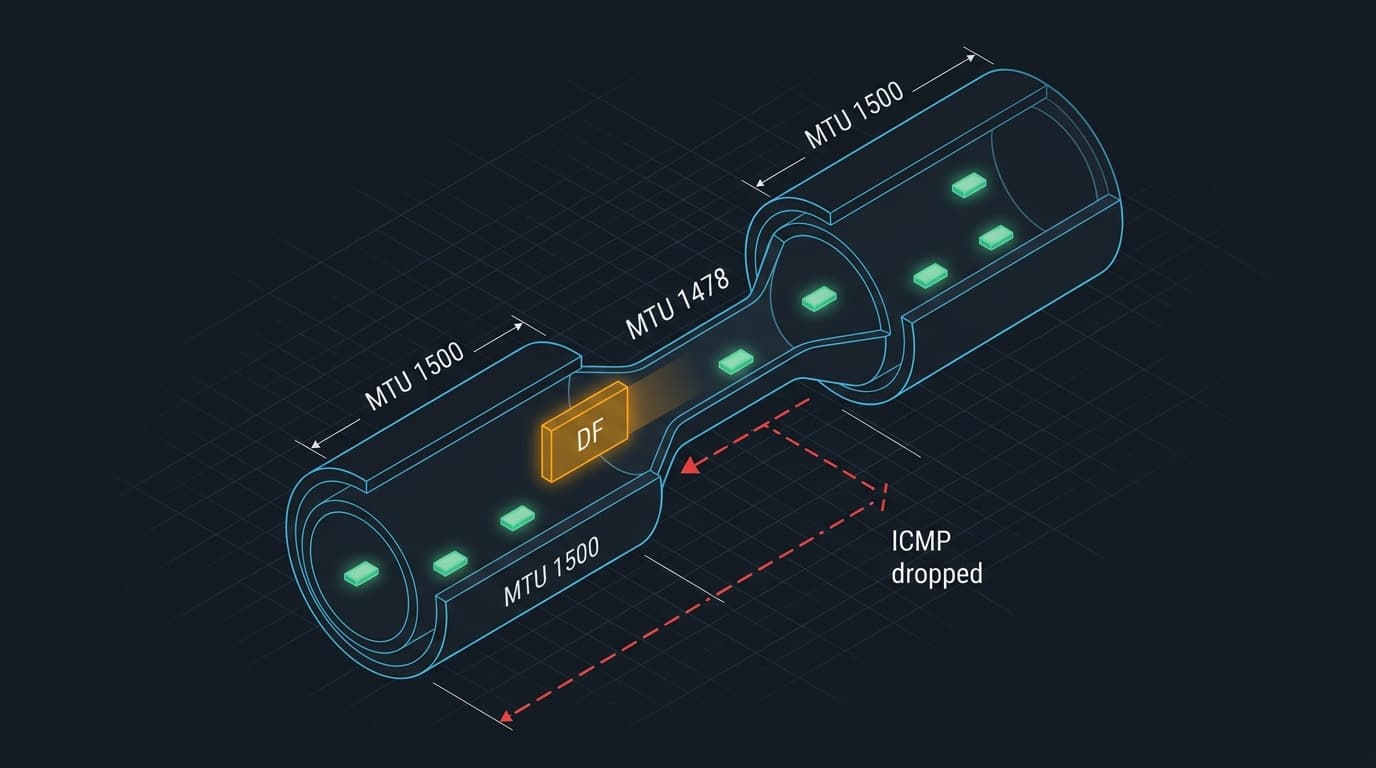
The actual breakdown had nothing to do with IAM. The upstream network path to the AWS sign-in and OIDC endpoints had an effective Path Maximum Transmission Unit (Path MTU) smaller than the standard 1500 bytes advertised by local interfaces. Because intermediate network equipment silently dropped ICMP “Fragmentation Needed” messages, Path MTU Discovery (PMTUD) failed to adapt.
The result was a classic PMTUD black hole: small packets—including TCP connection handshakes and small HTTP redirects—passed through seamlessly, while larger packets carrying TLS handshake certificates were swallowed by the network until connections timed out.
1. Problem & Symptoms
When attempting to sign in through the AWS access portal, the browser hung for over 20 seconds before displaying a generic error:
Sign-in Error
An error occurred during sign-in. Please try again or contact your administrator.
To isolate whether this was an application failure or an endpoint issue, I probed the three distinct AWS endpoints involved in the authentication flow from the terminal:
| Endpoint | Target URL / Host | HTTP Status | Measured Duration | Observed Behavior |
|---|---|---|---|---|
| Portal | <AWS_PORTAL_ENDPOINT> |
302 Found |
3.58s | Responded slowly, but loaded |
| Signin | signin.aws.amazon.com |
000 |
20.0s | Connection read timeout |
| OIDC | oidc.us-east-1.amazonaws.com |
000 |
20.0s | Connection read timeout |
The portal was responding—albeit noticeably sluggishly—while the identity and token endpoints timed out completely.
I next tested Layer 4 TCP connectivity versus Layer 7 TLS negotiation from the terminal:
# 1. TCP Layer 4 probes: both endpoints succeed immediately on port 443
nc -zvw3 signin.aws.amazon.com 443
nc -zvw3 oidc.us-east-1.amazonaws.com 443

# 2. TLS Layer 7 probe: completes TCP handshake, then hangs indefinitely
openssl s_client -connect signin.aws.amazon.com:443 -servername signin.aws.amazon.com
The nc probes confirmed TCP port 443 was fully open and accepting connections. However, openssl s_client connected at Layer 4, emitted CONNECTED(00000003), and then stalled indefinitely. No certificate chain arrived, no cipher negotiation completed, and the connection terminated with a read timeout after 20 seconds.
This provided the central paradox of the investigation:
- DNS resolution was instantaneous.
- TCP 3-way handshakes completed without packet loss.
- TLS handshakes stalled and failed completely before certificate exchange.
2. Timeline of the Incident
| Time | Action | Observation / Diagnostic State |
|---|---|---|
| 09:15 | Attempted sign-in to AWS access portal. | Portal loaded; login hung and timed out after 20s. |
| 09:18 | Checked local clock via timedatectl. |
Offset ~0s; clock synchronized. (Ruled out previous skew bug). |
| 09:22 | Probed endpoints via nc and openssl. |
TCP 443 open; TLS negotiation hung before certificate exchange. |
| 09:26 | Inspected routing table and VPN routes. | Public AWS routes bypass VPN; traffic leaves default Wi-Fi interface. |
| 09:30 | Executed Don’t-Fragment (-M do) ping sweep. |
1472-byte ICMP payloads dropped with 100% loss. |
| 09:34 | Binary-search sweep to pinpoint Path MTU. | signin: PMTU 1478 bytes; Portal: PMTU 1492 bytes. |
| 09:38 | Clamped local Wi-Fi and VPN interfaces to 1400. | MTU immediately updated in kernel and NetworkManager. |
| 09:40 | Re-tested curl against all three endpoints. |
signin: 302 in 0.71s; oidc: 403 in 0.89s; Portal: 302 in 0.15s. |
| 09:42 | Re-attempted web sign-in. | Authentication completed successfully. |
3. Diagnosis & Disproved Hypotheses
Hypothesis 1: Clock Skew Recurring
Because a 5-hour clock skew had broken IAM Identity Center four days earlier, verifying system time was the first low-cost test. Running timedatectl showed System clock synchronized: yes, NTP service: active, and RTC in local TZ: no. The system time was within milliseconds of reference NTP time. Timekeeping was healthy.
Hypothesis 2: VPN Routing Pulling Public Traffic
The workstation had an active AWS VPN client connection to a private VPC environment. A common failure mode is default-route hijacking, where public internet traffic is inadvertently captured by the VPN tunnel and dropped by a central NAT gateway.
Inspecting ip route show disproved this: the VPN used strict split tunneling for private CIDR blocks (10.0.0.0/8, 172.16.0.0/12), while public IP blocks for signin.aws.amazon.com and oidc.us-east-1.amazonaws.com traversed the default Wi-Fi gateway. Public AWS traffic never touched the VPN tunnel.
However, inspecting the VPN tunnel interface revealed it had an MTU of 1500—an architectural trap waiting to happen over an underlying 1500-byte physical link, but not the direct cause of this specific public endpoint failure.
Hypothesis 3: AWS Service Degradation or Local Port Blocking
Because TCP port 443 completed its 3-way handshake, local firewalls, intermediate port blockers, and endpoint outages were ruled out. A dead endpoint or blocked port fails at the initial SYN packet; here, SYN-ACK returned normally.
The Decisive Contradiction: TCP Connects, TLS Stalls
The observation that TCP succeeded while TLS stalled pointed directly at packet sizing:
- TCP 3-Way Handshake: Consists of tiny packets (
SYN,SYN-ACK,ACK), typically 40 to 60 bytes. They easily traverse any network link. - Client Hello: Typically 200 to 500 bytes. Passes through without fragmentation.
- Server Hello & Certificate Chain: Modern TLS certificates, intermediate CA bundles, and cryptographic parameters often total 2,000 to 4,000 bytes, transmitted in multi-packet bursts or full-sized Maximum Transmission Unit (MTU) segments (1500 bytes).
If a network path drops packets larger than a specific threshold without notifying the sender, small packets succeed while large certificate transfers vanish.
4. Measuring the Path MTU Boundary
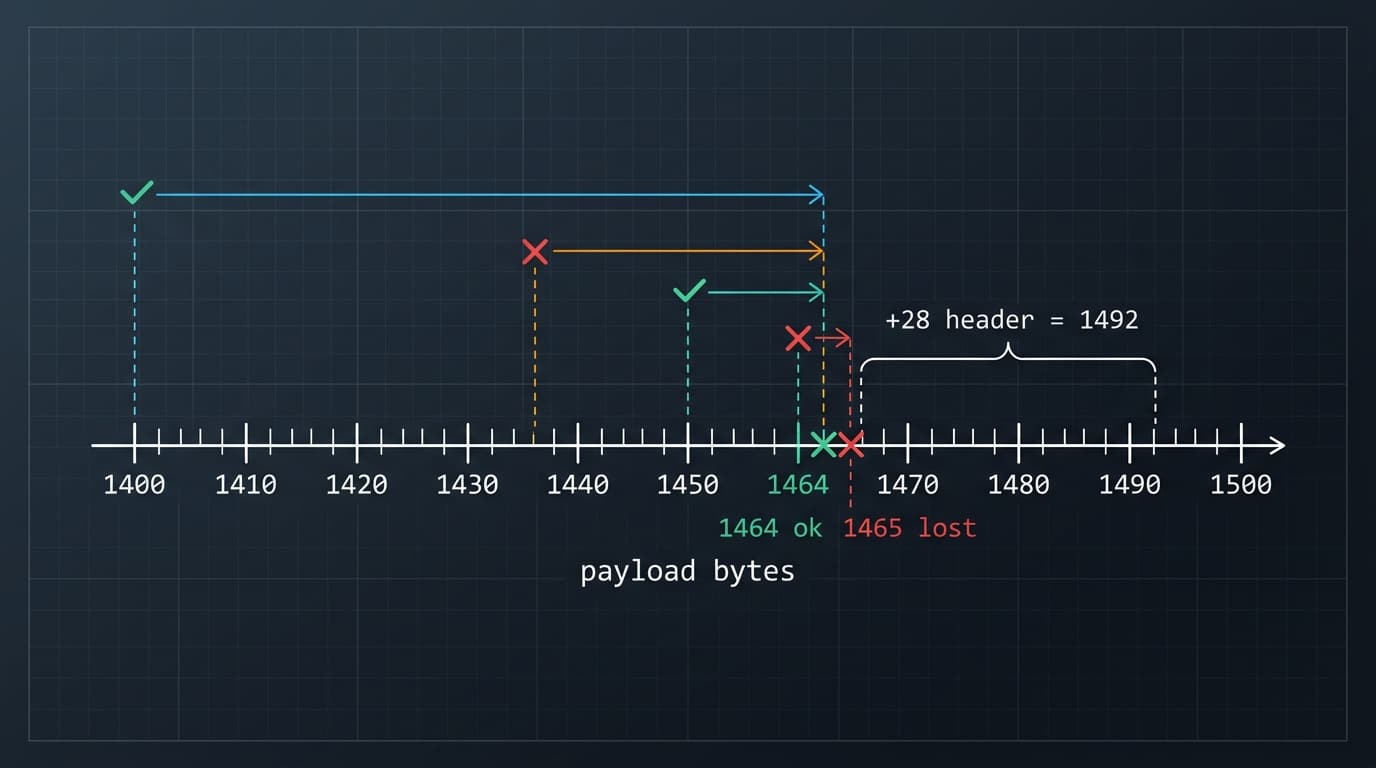
To test whether the path was dropping large packets, I used ping with the Don’t Fragment flag (-M do on Linux), running a binary search across payload sizes:
# 1. Standard 1500-byte IP frame (1472 payload + 28 bytes IP/ICMP headers) fails with DF set
ping -c1 -M do -s 1472 signin.aws.amazon.com

# 2. Binary search on payload size to identify the exact drop boundary
ping -c1 -M do -s 1460 signin.aws.amazon.com   # 100% packet loss
ping -c1 -M do -s 1440 signin.aws.amazon.com   # 0% packet loss
ping -c1 -M do -s 1450 signin.aws.amazon.com   # 0% packet loss (maximum payload)
ping -c1 -M do -s 1451 signin.aws.amazon.com   # 100% packet loss

# 3. Repeat sweep for the access portal endpoint
ping -c1 -M do -s 1464 <AWS_PORTAL_ENDPOINT>   # 0% packet loss (maximum payload)
ping -c1 -M do -s 1465 <AWS_PORTAL_ENDPOINT>   # 100% packet loss
Adding 28 bytes of IP and ICMP headers to the maximum successful payloads revealed the true Path MTU limits versus local interface configuration:
| Network Path / Interface | Max ICMP Payload | Header Overhead | Effective Path MTU | Advertised Interface MTU |
|---|---|---|---|---|
signin.aws.amazon.com |
1450 bytes | 28 bytes | 1478 bytes | 1500 bytes |
<AWS_PORTAL_ENDPOINT> |
1464 bytes | 28 bytes | 1492 bytes | 1500 bytes |
| Local Wi-Fi Interface | — | — | — | 1500 bytes |
| Local VPN Tunnel Interface | — | — | — | 1500 bytes |
The host was transmitting 1500-byte frames into paths capped at 1478 and 1492 bytes.
5. Root Cause: The PMTUD Black Hole
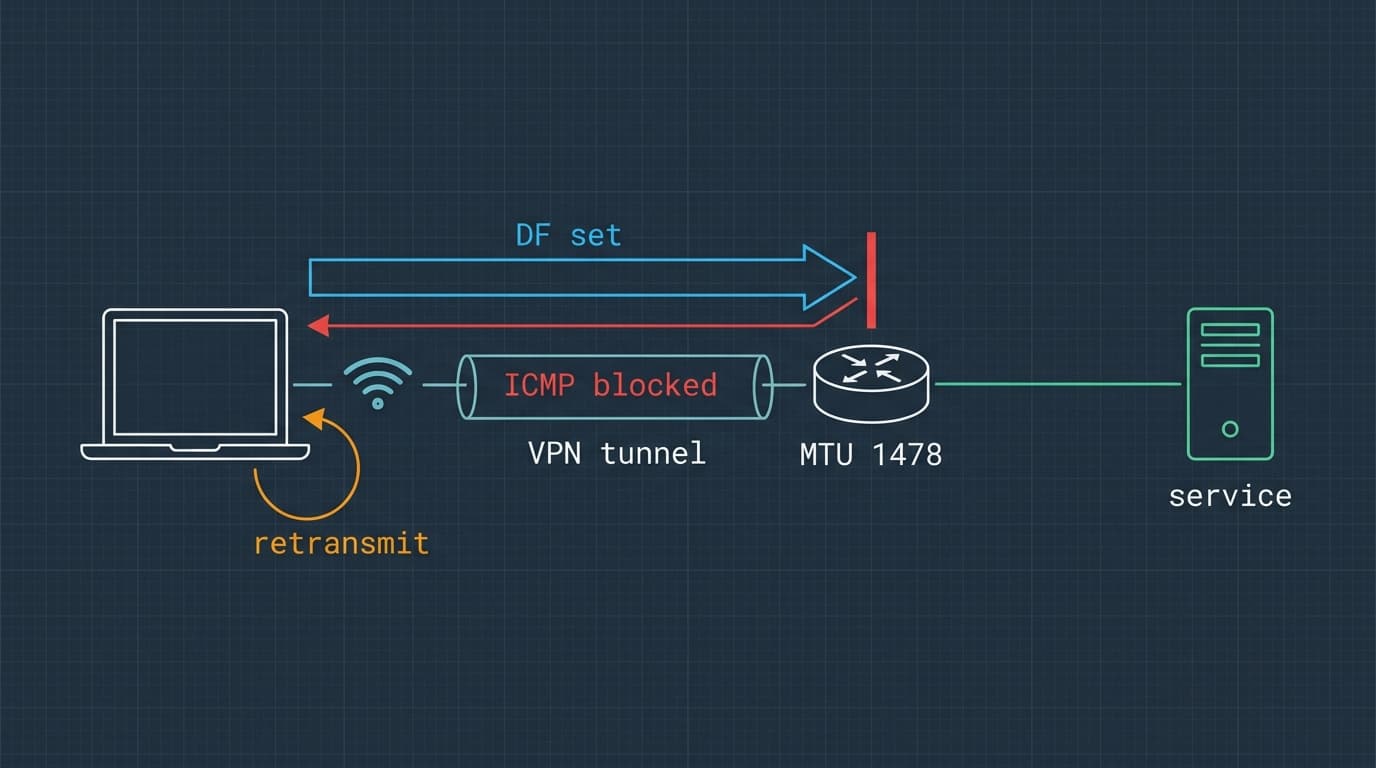
Two conditions turned this MTU mismatch into an unrecoverable failure:
1. Upstream Tunneling / PPPoE Overhead
A Path MTU of 1492 bytes is the classic signature of PPPoE encapsulation (which consumes 8 bytes of the standard 1500-byte Ethernet frame). A Path MTU of 1478 bytes indicates an additional encapsulation layer along the transit path (such as carrier-grade NAT, GRE tunneling, or intermediate mobile/ISP backhaul).
These constraints were upstream network properties beyond host control.
2. Dropped ICMP Type 3, Code 4 Messages
Under standard Path MTU Discovery (RFC 1191):
- The sender transmits a packet with the Don’t Fragment (DF) bit set in the IP header.
- When an intermediate router cannot forward the packet because it exceeds the next-hop MTU, the router drops the packet.
- The router sends back an ICMP message: Type 3 (Destination Unreachable), Code 4 (Fragmentation Needed and DF set), specifying the next-hop MTU.
- The sending host receives the ICMP message and lowers its cached MTU for that destination.
In this network path, intermediate firewalls or ISP middleboxes were aggressively filtering inbound ICMP traffic. The ICMP “Fragmentation Needed” packets never made it back to the Linux workstation.
Because the host never received ICMP notifications, it had no way of knowing its packets were too large. The TCP stack assumed the missing packets were lost to normal congestion and kept retransmitting full-sized 1500-byte TLS packets indefinitely. This created a complete black hole.
Why the Portal Partially Loaded
The size-dependent nature of the black hole explains why the access portal appeared to work while sign-in failed:
| Traffic Component | Typical Packet Size | Path MTU Status | Result |
|---|---|---|---|
| TCP 3-Way Handshake | 40–60 bytes | $< 1478$ bytes | Established immediately |
| HTTP Request | 300–800 bytes | $< 1478$ bytes | Delivered successfully |
| Portal Response | Small chunks | $< 1492$ bytes | Loaded (slowly, with retransmissions) |
| Signin TLS ServerHello / Certs | $> 1478$ bytes | Exceeded 1478 bytes | Dropped silently at intermediate hop |
6. The Fix & Verification
To eliminate the black hole, the local interface MTU was clamped below the measured path limit. A conservative value of 1400 bytes was chosen to safely accommodate both the 1478-byte bottleneck and any potential VPN encapsulation headers:
# 1. Immediately clamp the active network interfaces to 1400 bytes
sudo ip link set dev <WIRELESS_INTERFACE> mtu 1400
sudo ip link set dev <VPN_TUNNEL_INTERFACE> mtu 1400

# 2. Persist the MTU for the Wi-Fi connection in NetworkManager
nmcli connection modify "[WIFI_CONNECTION_NAME]" 802-11-wireless.mtu 1400

# 3. Test endpoints with curl after applying the 1400-byte clamp
curl -s -o /dev/null -w "%{http_code} in %{time_total}s\n" https://signin.aws.amazon.com
curl -s -o /dev/null -w "%{http_code} in %{time_total}s\n" https://oidc.us-east-1.amazonaws.com
curl -s -o /dev/null -w "%{http_code} in %{time_total}s\n" https://<AWS_PORTAL_ENDPOINT>
Measured Telemetry Before & After
| Endpoint | Before Fix (MTU 1500) | After Fix (MTU 1400) | Outcome |
|---|---|---|---|
signin.aws.amazon.com |
000 (timed out after 20.0s) |
302 in 0.71s |
Full TLS exchange completed |
oidc.us-east-1.amazonaws.com |
000 (timed out after 20.0s) |
403 in 0.89s |
Reachable (403 expected without auth) |
<AWS_PORTAL_ENDPOINT> |
302 in 3.58s |
302 in 0.15s |
24× faster (packet loss eliminated) |
The 403 Forbidden response from the OIDC endpoint was a definitive verification success: it proved that the TLS negotiation had completed and that the AWS application server had parsed the raw HTTP request.
Returning to the browser and initiating sign-in through the portal succeeded immediately without delay.
7. Follow-Up Work & Persistence
Persisting MTU for Dynamic VPN Tunnels
Unlike physical interfaces, VPN clients frequently tear down and recreate virtual tun interfaces upon reconnecting. Setting the MTU via ip link is transient.
To persist the 1400-byte MTU across reconnects, a NetworkManager dispatcher script was created at /etc/NetworkManager/dispatcher.d/99-vpn-mtu.sh:
#!/bin/bash
# /etc/NetworkManager/dispatcher.d/99-vpn-mtu.sh
INTERFACE="$1"
ACTION="$2"

if [ "$INTERFACE" = "<VPN_TUNNEL_INTERFACE>" ] && [ "$ACTION" = "up" ]; then
    ip link set dev "$INTERFACE" mtu 1400
fi

exit 0
Make the script executable:
sudo chmod +x /etc/NetworkManager/dispatcher.d/99-vpn-mtu.shFast Triage One-Liner
If authentication or TLS handshakes hang intermittently in the future, a single command quickly determines whether the current path satisfies standard 1500-byte framing:
ping -c1 -M do -s 1472 signin.aws.amazon.comIf this probe returns 100% loss while a standard ping succeeds, the path MTU is restricted and PMTUD is blocked.
MTU Clamping vs TCP MSS Clamping
Lowering the interface MTU is effective and easily reversible, but it affects all protocols (including UDP) on that interface.
An alternative production-grade solution is TCP Maximum Segment Size (MSS) clamping on the local firewall:
sudo iptables -t mangle -A FORWARD -p tcp --tcp-flags SYN,RST SYN -j TCPMSS --clamp-mss-to-pmtuMSS clamping intercepts TCP SYN packets and rewrites the advertised MSS option so that neither endpoint ever attempts to transmit segments larger than the path can support, eliminating the risk of PMTUD black holes while leaving interface MTUs at standard values.
8. Key Takeaways
- Application-layer symptoms often conceal transport-layer faults. A generic sign-in error or “contact administrator” modal should not limit your troubleshooting to IAM permissions.
- TCP connectivity does not prove HTTPS works. A successful Layer 4 three-way handshake only proves small packets pass. TLS handshakes require multi-kilobyte exchanges that trigger MTU boundaries.
- Partial page rendering is a major diagnostic clue. When a site’s HTML shell loads but specific API calls hang, check for packet-size sensitivity rather than total network failure.
- Use
ping -M doto demystify Path MTU. Setting the Don’t Fragment bit and performing a binary search on payload sizes turns an invisible routing anomaly into a concrete, measurable number. - Always audit virtual and VPN interface MTUs. Running a tunnel interface at MTU 1500 over an underlying 1500-byte physical connection guarantees fragmentation or packet loss unless the tunnel or network actively enforces MSS clamping.
Related: the same oversized tunnel MTU later broke SSH. See SSH KEX Hang: A VPN Tunnel at MTU 1500 is not a Tunnel.