SSH KEX Hang: A VPN Tunnel at MTU 1500 is not a Tunnel
SSH connects, then dies mid-handshake. A local port-forward to a remote database cluster through a bastion stopped working, hanging on the first large packet of the SSH session. How an oversized MTU on a VPN interface created a silent black hole.

1. Summary
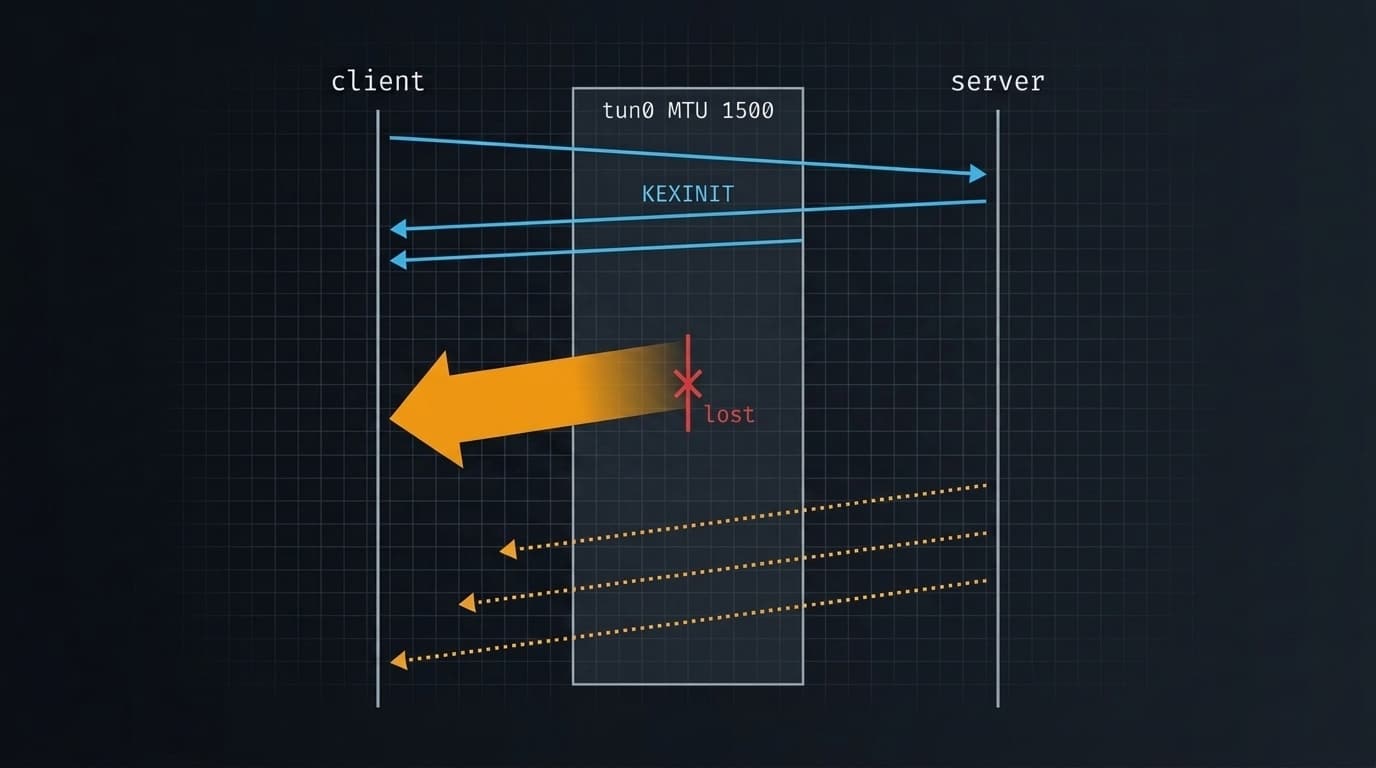
A local port-forward to a remote database cluster through a bastion stopped working. The VPN was connected, the bastion’s TCP port 22 accepted connections, and the ssh process stayed alive — but the forwarded port never began listening. Verbose ssh showed the session hanging at expecting SSH2_MSG_KEX_ECDH_REPLY, the handshake’s first full-size packet. tun0 was at MTU 1500, identical to the physical link, so every encapsulated packet was oversized before leaving the machine and was dropped silently upstream. Setting tun0 to MTU 1300 fixed it immediately.
The mechanism was already documented on this machine eight days earlier as a latent defect (see the MTU black hole write-up). It was never made persistent, and tun0 resets to 1500 on every VPN reconnect.
2. Symptoms
What I observed
- The wrapper reported the tunnel unhealthy; the
sshprocess was alive, not crashed. 127.0.0.1:27017never began listening.- TCP port 22 to the bastion succeeded — which is what made this confusing.
- The VPN was connected throughout, with a valid route to the bastion.
Exact errors / output
Process up, nothing listening:
✗ dev tunnel not healthy:
   Main PID: <PID> (ssh)
     CGroup: /user.slice/.../[email protected]
             └─<PID> /usr/bin/ssh -N -o BatchMode=yes -L 27017:<INTERNAL-HOST>:27017 bastion-host
dev active
:27017 not listeningJournal entry from before the VPN settled:
Sep 15 16:44:05 <HOSTNAME> ssh[<PID>]: Connection to <INTERNAL-IP> port 22 timed out
Sep 15 16:44:05 <HOSTNAME> systemd[...]: [email protected]: Main process exited, code=exited, status=255/EXCEPTION
The decisive line, from ssh -vv — no further output, killed by timeout 25, exit 124:
debug1: kex: curve25519-sha256 need=32 dh_need=32
debug1: expecting SSH2_MSG_KEX_ECDH_REPLY
3. Timeline
Real timestamps where the session or journal recorded them.
| Time (IST) | Event |
|---|---|
16:44:05 |
Journal records Connection to <INTERNAL-IP> port 22 timed out. Unit restarts, fails again. |
16:50 |
Journal read; the 16:44 timeout taken at face value. |
16:50 |
Route checked: bastion reachable via tun0. Raw TCP to port 22 succeeds. Contradiction noted. |
not captured |
First ssh -vv piped through tail under timeout — kill discarded all output. Own process error. |
~16:51 |
ssh -vv to a file: hang at expecting SSH2_MSG_KEX_ECDH_REPLY. tun0 found at MTU 1500. Cause established. |
~16:52 |
sudo ip link set dev tun0 mtu 1300; systemctl --user restart [email protected] → ✓ dev tunnel up on 127.0.0.1:27017. |
16:53 |
Prior note from 2026-09-07 located; it had already flagged tun0 at 1500 as latent. |
17:17 |
Second issue surfaced: the persisted clamp existed on one wifi profile only; machine had been on a phone hotspot. |
17:19 |
Follow-up persistence fixes drafted (unverified in this session). |
4. Initial Hypotheses
Hypothesis 1 — the VPN is down or the bastion is unreachable
Why: the journal’s most recent line said exactly that, and the VPN had just been reconnected.
What I checked: ip route get to the bastion, raw TCP open to port 22.
Result: Disproved. Route correct and via tun0; port22 OK. The journal line was stale — it described a state from minutes earlier. Reading the newest error in a journal as the current error is a trap when a systemd unit has been restart-looping.
Hypothesis 2 — something else holds local port 27017
Why: active plus :27017 not listening fits a bind conflict, and the session had recently switched environments on the same port.
What I checked: ss -ltnp | grep 27017.
Result: Disproved. Nothing listening at all. A bind conflict would show the other process holding it. An empty result meant ssh had not reached the point of opening the forward — reframing the problem from “port” to “handshake”.
Hypothesis 3 — the health check is racing the tunnel
Why: at 16:48:55 the dev unit was stopped seconds after starting, so the first unhealthy report was plausibly checked too early.
What I checked: retried restarting the tunnel service alone and waited.
Result: Disproved. Still not listening after the wait.
5. Investigation
5.1 The contradiction that reframed everything
timeout 8 bash -c 'cat < /dev/null > /dev/tcp/<INTERNAL-IP>/22' && echo "port22 OK" || echo "port22 FAIL"port22 OKThe path to the bastion is open, so the journal’s timeout was not describing the present. But ssh still produced no forward. Port reachable and session never established cannot both be true unless something inside the connection is failing.
5.2 An own-goal: losing the evidence to a pipe
timeout 25 ssh -vv -N ... bastion-host 2>&1 | tail -40Terminated timeout 25 ssh -vv ... | tail -40This told me nothing — and that is the point. timeout killed the pipeline, so tail never flushed and every debug line was lost. Redirecting to a file recovers the output regardless of how the process dies:
timeout 25 ssh -vv -N ... bastion-host > ssh.log 2>&1; echo "exit $?"; tail -30 ssh.log5.3 The establishing measurement
The client sent its key exchange and never received the reply. That reply carries the server’s host key and DH parameters — the first large packet of an SSH session. Everything before it is small and had gone through fine.
ip link show tun0 | head -2
ip link show <WIFI-INTERFACE> | head -2
6: tun0: ... mtu 1500 ...
3: <WIFI-INTERFACE>: ... mtu 1500 ...The tunnel interface advertised the same MTU as the link carrying it. A 1500-byte packet handed to tun0 becomes 1500 bytes plus encapsulation headers on the wire — already over the physical limit before it leaves the machine.
6. Key Clue
TCP connected, handshake never completed. That pair is close to diagnostic for a size problem, and it eliminated three families of cause at once:
- A firewall block refuses or resets immediately — it does not accept and then go quiet.
- A dead host does not complete the TCP handshake at all.
- An auth failure produces an error, not silence.
Only a packet-size fault lets small packets through and swallows large ones. The size boundary is why the failure looked application-shaped: every part of the protocol that is small worked perfectly.
7. Root Cause
Primary cause
tun0 was at MTU 1500 while carrying traffic over a 1500-byte physical link. Every full-size packet, once encapsulated, exceeded what the path could carry and was dropped upstream. SSH’s KEX_ECDH_REPLY is the first full-size packet in the session, so that is where it died.
Background: the sender is meant to learn about an undersized path from ICMP type 3 code 4 (“fragmentation needed”). That ICMP is widely filtered, and when it never arrives the sender keeps retransmitting a packet that can never be delivered — a black hole rather than an error. Whether that ICMP was specifically filtered on this path was not measured here; the observed silent hang is consistent with it.
Contributing factors
- The defect was already known and left unpersisted. A note on this machine dated 2026-09-07 identified
tun0at MTU 1500 as a real but latent defect, explicitly predicting it “would corrupt any large transfer over the VPN, which includes database traffic through the tunnel.” It also recorded that the AWS VPN Client destroys and recreatestun0at its own default of 1500 on every connect, so the clamp must be reapplied each time. The proposed NetworkManager dispatcher hook was written down and never installed. - A stale journal line pointed the wrong way. A restart-looping unit leaves its last failure in the log, which reads as current.
- A second, partly-established gap. The persisted wifi-side clamp from the 2026-09-07 note was applied to one saved wifi profile only, and the machine was on a phone hotspot profile during part of this session. This did not cause the SSH failure — the bastion is inside the VPN routes, so that traffic went over
tun0regardless of the wifi beneath it. It is a separate exposure, for VPN-external traffic.
Why the original symptoms were misleading
sshstayed alive. A process that has not crashed reads as working, sending attention to the health check and the local port.- Port 22 was open. Every reachability test passed, making “the network is fine” feel established when only the small-packet network was fine.
- The failure was reported by a local wrapper.
✗ dev tunnel not healthyinvites suspicion of the wrapper, the unit, or a port conflict — all local, all wrong.
The initial symptom was deceptive: the VPN was connected and healthy, yet the tunnel wouldn’t establish. The connection genuinely was up, but misconfigured at the packet boundary—which no simple reachability check distinguishes.
8. Resolution
sudo ip link set dev tun0 mtu 1300
systemctl --user restart [email protected]
What changed: the tunnel interface’s MTU, in the running kernel only. This does not persist — the AWS VPN Client recreates tun0 at 1500 on every connect.
Follow-up steps to make the MTU clamp survive reconnects (not directly captured or verified in this session):
sudo nmcli connection modify "<WIFI-HOTSPOT>" 802-11-wireless.mtu 1400

sudo install -m 755 -o root -g root /dev/stdin /etc/NetworkManager/dispatcher.d/50-tun0-mtu <<'EOF'
#!/bin/bash
# Clamp the AWS VPN tunnel to an MTU the upstream path can actually carry.
[ "$1" = "tun0" ] && [ "$2" = "up" ] && ip link set dev tun0 mtu 1400
exit 0
EOF
The dispatcher hook is what makes the tun0 clamp survive a reconnect — the step the 2026-09-07 note specified and that was never carried out.
9. Verification
Tunnel came up immediately after the MTU change, having failed repeatedly for ~8 minutes before it:
✓ dev tunnel up on 127.0.0.1:27017Verified here: tun0 was at MTU 1500; ssh hung at expecting SSH2_MSG_KEX_ECDH_REPLY; TCP port 22 was open; the route to the bastion went via tun0; the tunnel came up at MTU 1300.
Not verified here:
- Whether 1400 (the dispatcher hook’s value) is also sufficient — only 1300 was tested.
- Live MTU values after the later wifi reconnect; that read-back was cancelled mid-run.
- The path MTU to the bastion was never measured with
ping -M do. The fix followed from the interface-vs-path mismatch alone, so the exact path figure is not established. - Whether the follow-up persistence commands and dispatcher script executed cleanly (unverified in this session; no output was captured).
Final result: Resolved
10. Follow-up / Remaining Risks
- Confirm the dispatcher hook fires. Reconnect the VPN and check
ip link show tun0reads 1400. A dispatcher script with wrong ownership or mode is ignored silently by NetworkManager — it fails exactly like not being installed. - 1400 is untested on this path. Only 1300 was proven. If the hang returns after a reconnect, measure with
ping -c1 -M do -s <size>and binary-search rather than guessing again. - Other saved wifi profiles carry no clamp, and the hook matches
tun0by name — a new network or a new VPN client reintroduces this.
11. Lessons Learned
- A documented latent defect that is not made persistent is a scheduled incident. The cause, the fix, and the exact reason it would reappear were all written down eight days earlier in a file on the same machine. The only missing step was installing a five-line script. The write-up was treated as the resolution.
- The newest line in a journal is not necessarily the current state. For a restart-looping unit it is the last attempt, which may predate whatever changed since. I spent the first minutes chasing a timeout that had already stopped being true.
- “VPN is connected” answers a different question than “VPN is correctly configured”. Route, interface up, port open — all test reachability. None tests whether the interface can carry a full-size packet.
12. Useful Commands / References
Commands
# Where an SSH session actually stops — never pipe this through tail under timeout
timeout 25 ssh -vv -N -o BatchMode=yes -o ConnectTimeout=10 <host> > ssh.log 2>&1; tail -30 ssh.log

# Reachability without ssh: does the port open at all?
timeout 8 bash -c 'cat < /dev/null > /dev/tcp/<host>/22' && echo OK || echo FAIL

# Interface MTU, and the route actually taken
ip link show tun0 | grep -o 'mtu [0-9]*'; ip route get <host>

# Measure real path MTU rather than guessing (1472 = largest payload fitting MTU 1500)
ping -c1 -M do -s 1472 <host>
References
- Prior note on this machine, 2026-09-07, documenting the same MTU mechanism against a different victim (HTTPS sign-in over wifi) and flagging
tun0at 1500 as latent.
Investigated and documented by @ajithakdev. Published so the next person finds this in a search instead of losing the same hours.